Field notes · Qwen2.5-7B on an Apple M5 Pro
What it’s actually like to run a small LLM on your own Mac
A 4 GB file, no API key, no server. I ran one to see the speed, the setup, what you can watch happening inside it, and where it falls short.
- 7.6 B
- parameters, the numbers the model is made of
- 44 s
- to download the 4 GB model
- 4.4 GB
- of memory in use, out of 48 GB
- ~67
- tokens per second while answering
Why I ran a model on my own Mac
Most of us use frontier models (like OpenAI’s and Anthropic’s) that run on remote servers. You type a question, it travels to a data center, a rack of GPUs answers, and the reply comes back. Nothing about that happens on your own machine.
I got curious what the opposite looks like: a model that lives entirely on my Mac, with no API and no account. So I downloaded a free, open-weight one, ran it, asked it questions, and opened the file to see what a model actually is. I also wrote the word-by-word generation loop, so I could see what the libraries hide.
This page is what I found: what it costs, how fast it is, and where it breaks.
The model is one file, and it’s only numbers
The model is a single 4 GB file holding 7.6 billion numbers, each squeezed down to about 4 bits. At full precision it would be around 15 GB. To see inside one, I opened a much smaller model, SmolLM2-135M, byte by byte. It is 134,515,008 numbers behind a 30 KB header that says where each block starts. Here are the first 16 bytes of one weight matrix, read two at a time:
Layer 0, query matrix, first row. Each pair is one bfloat16 number.
That is the whole model: no text, no rules, no database. Training nudged these numbers until the model predicted text well, and they still carry meaning. In the same file, the vectors for “Paris” and “France” are 0.65 similar, “cat” and “dog” 0.56, “cat” and “the” 0.16.
Setup is three commands
# Python 3.11 + Apple's MLX library
python3.11 -m venv .venv && source .venv/bin/activate
pip install mlx mlx-lm

# chat with a 4-bit 7B model
mlx_lm.chat --model mlx-community/Qwen2.5-7B-Instruct-4bit
The first run pulled the 4 GB of weights in 44 seconds. After that, the model runs on your machine and your prompts never leave it.
It writes faster than you can read
I measured it across six different prompts, each generating 300 tokens: every run landed between 66.8 and 67.3 tokens per second. Shorter answers looked slower and noisier, because startup time weighs more when there are few tokens.
In everyday chat it was very fast: responses came back quickly and streamed out faster than I could read them. What I learned is why. A hosted frontier model, like Anthropic’s or OpenAI’s, is far larger (their exact sizes aren’t public), so every word takes more computation, and every request also makes a round trip over the network to a data center and back. This model has none of that: it is small, so each new word needs only about 4 GB read from memory; there is no network trip; and the whole GPU serves one person.
That can make a small local model feel faster than a big hosted one. It is a speed result, not a smarts result, and I didn’t benchmark a hosted model against this.
You can see it choosing each word
A language model writes one word at a time. Before each word it gives every possible next word a percentage chance, then picks one. Running it yourself lets you print those chances.
Ask it to finish “The capital of France is” and it has no doubt: Paris gets 100%. Ask it for a story and the choices get more interesting. Here is a line it wrote:
In the neon-drenched streets of Jazzyville, where the rhythms never
…where the rhythms
“of” was the clear favorite, but the model picked “never”, a 1% option, and the sentence went somewhere odd. A setting called temperature controls how often it strays from its favorite: turn it down and it plays safe, turn it up and it wanders.
Percentages are rounded. The France answer came from a run at temperature 0.8, the story at 1.0.
Where it stumbles: confident and wrong
I asked which movies won Best Picture each year starting in 2015. This is the unedited terminal screenshot:
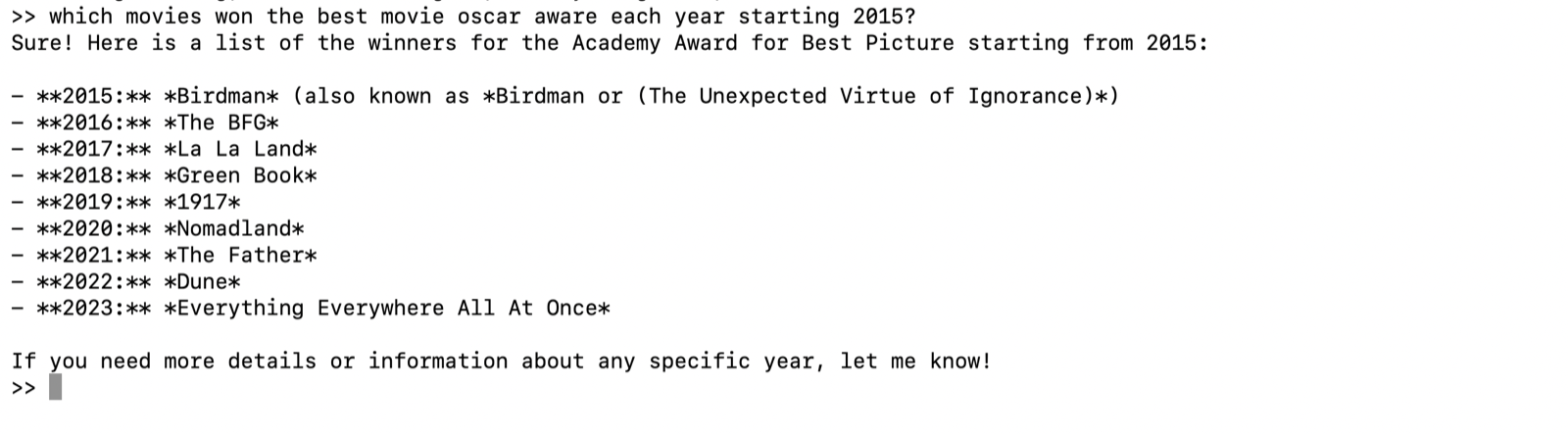
By year of the ceremony, only 2 of the 9 are right. Count by film year instead and it is still 2 of 9. Here is the answer against the real winners:
| Year | Model said | Actual winner | |
|---|---|---|---|
| 2015 | Birdman | Birdman | ✓ |
| 2016 | The BFG | Spotlight | ✗ |
| 2017 | La La Land | Moonlight | ✗ |
| 2018 | Green Book | The Shape of Water | ✗ |
| 2019 | 1917 | Green Book | ✗ |
| 2020 | Nomadland | Parasite | ✗ |
| 2021 | The Father | Nomadland | ✗ |
| 2022 | Dune | CODA | ✗ |
| 2023 | Everything Everywhere All At Once | Everything Everywhere All at Once | ✓ |
Nothing in the reply signals doubt. That is the risk with a small model: it is fluent and sure of itself, and light on facts, so check anything that matters. It also answered a question about transformer KV caches with the database kind. My question was ambiguous, but it is the same kind of miss.
The takeaway: local models have a place
A small model on your own machine is not a replacement for a frontier model, and it doesn’t need to be. It is a different tool, and for some jobs it is the better one.
- Privacy. Your prompts and files never leave the Mac, so sensitive notes, documents or code can go through it without being sent to anyone’s server.
- Speed. There is no network round trip and no queue, so replies felt instant and streamed at about 67 tokens/sec.
- Cost. After the one-time download there are no per-token fees, so you can run as many prompts as you like. The only cost is the electricity and the Mac you already own.
- Offline and control. It works without an internet connection, and you choose the model and settings like temperature.
The Oscars answer shows the other side. A small model is fluent but light on facts, so when accuracy or deep reasoning matters, a larger hosted model is still the right call. I’d use each where it fits: local for private, quick, bounded work like summarizing, drafting, extracting or classifying text, and hosted for the hard questions. I only tested chat here, so treat those use cases as things to try, not results I measured.